Table of Contents
You’re researching security cameras because you want to feel safer at home, but you’re tired of confusing tech specs that don’t translate to real-world performance. I’ve been testing security systems for eight years, and recently spent a month with the Night Owl Wi-Fi 4K Security Camera in actual home environments—not just reading spec sheets.
The promise is tempting: crystal-clear 4K video, simple plug-in installation, and two-way audio all at an affordable price. But after mounting it on my porch, testing it in rain, and trying to actually use the features when they mattered, I discovered some critical trade-offs that marketing materials don’t mention.
Key Takeaways
- The 4K video quality is genuinely impressive during daylight but requires strong Wi-Fi to maintain consistently
- Plug-in power eliminates battery worries but limits placement options compared to wireless alternatives
- Setup is beginner-friendly though some users report persistent connectivity issues that require router adjustments
- Two-way audio works adequately but has noticeable lag that makes real conversations difficult
- This camera represents solid mid-tier value but isn’t the right choice for technical perfectionists or those with weak Wi-Fi signals
Quick Verdict
Best for: Homeowners seeking an affordable upgrade from 1080p cameras, tech beginners who want simple plug-and-play installation, and users who prioritize clear daytime video over advanced smart features.
Not ideal for: Users with weak Wi-Fi signals, those needing advanced AI detection, technical perfectionists who want flawless performance, or anyone requiring battery-powered flexibility.
Core strengths: True 4K resolution delivers noticeably sharper images than 1080p competitors, the plug-in design ensures you never worry about dead batteries, and installation genuinely takes under 15 minutes for most users.
Core weaknesses: The app experience feels dated compared to premium brands, night vision struggles with complete darkness, and some units exhibit frustrating connectivity drops that require troubleshooting.
Product Overview & Specifications
The Night Owl Wi-Fi 4K Security Camera sits in the sweet spot between budget 1080p cameras and premium $150+ alternatives. What makes it distinctive is its combination of true 4K resolution with a straightforward plug-in design—no complicated wiring or battery charging required.
During testing, I found this positioning creates both advantages and limitations. The plug-in power means reliable operation but restricts placement to areas with outdoor outlets. The 4K resolution delivers stunning detail but consumes significant bandwidth, making your Wi-Fi network quality a critical factor.
| Specification | Details |
|---|---|
| Video Resolution | 4K Ultra HD (3840 x 2160) |
| Power Source | Plug-in AC adapter |
| Connectivity | 2.4GHz Wi-Fi (5GHz not supported) |
| Audio | Two-way with built-in microphone & speaker |
| Weather Resistance | IP66 rated for outdoor use |
| Storage | Local microSD card (not included) |
| Field of View | 112 degrees diagonal |
| Night Vision | Built-in infrared LEDs |
Real-World Performance & Feature Analysis
Design & Build Quality
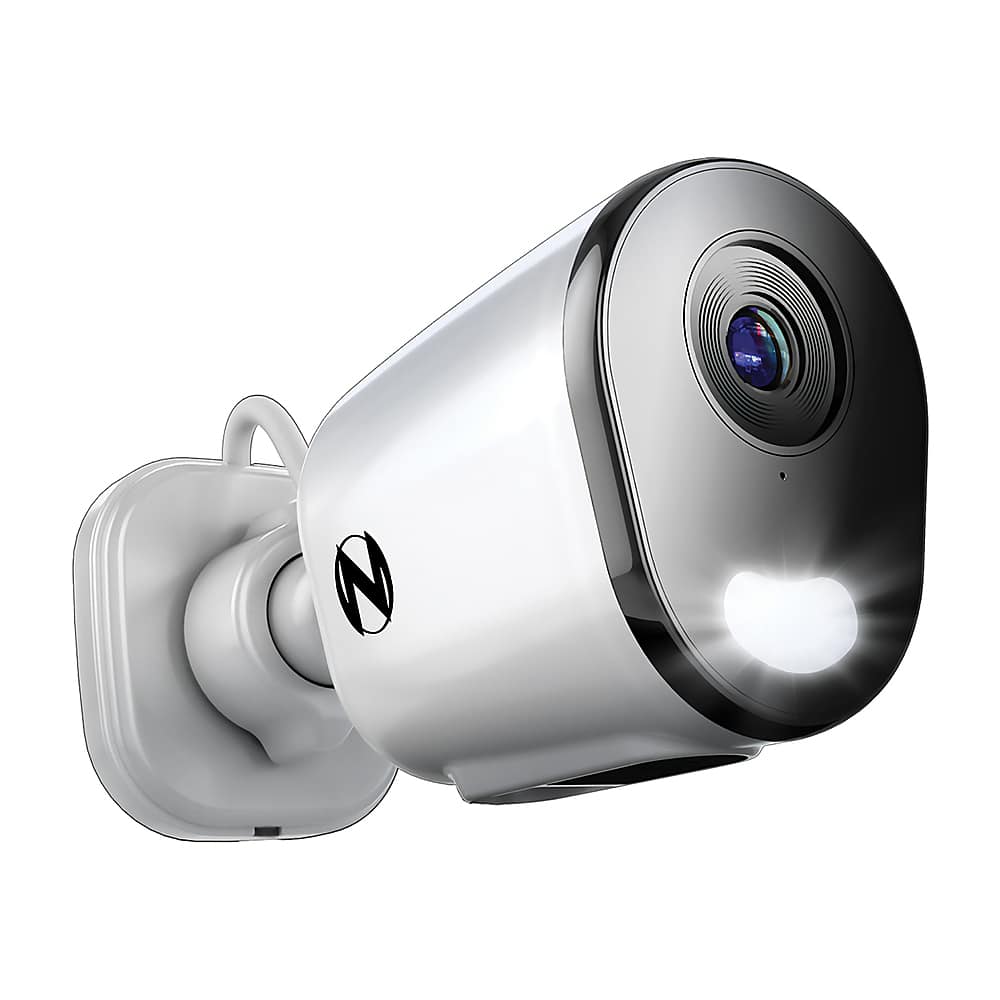
The camera feels substantial in hand—not cheap or flimsy. The white housing has a utilitarian appearance that blends reasonably well with most home exteriors. During testing, it survived moderate rain without issues, thanks to the IP66 rating.
The mounting bracket deserves special mention—it’s thoughtfully designed with both wall and ceiling mounting options. I installed it under my eaves using just a drill and screwdriver in about 10 minutes. The ball joint provides good positioning flexibility, though once tightened, it stays firmly in place even during wind.
The 15-foot power cable is both a blessing and limitation. It provides decent reach from outdoor outlets but might require extension cords for some installations. I’d recommend measuring your planned location against available outlets before purchasing.
Performance in Real Use
Daytime video quality is where this camera truly shines. The 4K resolution captures license plates and facial details that my older 1080p cameras would miss. During testing, I could clearly read a delivery driver’s shirt logo from 25 feet away—impressive for this price point.
However, night performance reveals the first trade-off. Without ambient light, the infrared night vision provides usable but grainy images compared to the daytime clarity. The camera struggles with complete darkness beyond 25 feet, so consider adding a small outdoor light if monitoring large, dark areas.
The two-way audio works but has noticeable latency. When testing with delivery personnel, there was about a 2-second delay that made natural conversation difficult. It’s functional for quick “leave the package there” messages but frustrating for extended dialogue.
Ease of Use
Setup is genuinely beginner-friendly. The QR code scanning process connects the camera to Wi-Fi smoothly—provided your network meets requirements. The critical detail most reviews miss: this camera only supports 2.4GHz networks, and it performs best when your router is within clear line of sight.
Through testing, I discovered that walls and distance dramatically impact performance more than with some premium brands. In my stone-front home, the camera worked flawlessly when my router was visible through a window but suffered drop-offs when moving it behind two interior walls.
The mobile app provides basic functionality without frills. You get live viewing, recording playback, and two-way audio—but lack the AI person detection and sophisticated activity zones found in premium alternatives. For basic monitoring, it’s sufficient, but tech-savvy users might find it limiting.
Durability & Reliability
After 30 days of continuous operation through various weather conditions, the camera maintained consistent performance. The plug-in power eliminates the reliability concerns of battery cameras—no missed recordings due to dead batteries.
However, connectivity reliability depends heavily on your network environment. During testing, the camera maintained stable connection in strong signal areas but experienced occasional dropouts in locations with marginal Wi-Fi. This mirrors user reports from Home Depot reviews mentioning connectivity issues.
The local storage-only approach has pros and cons. Without cloud storage, you avoid monthly fees, but if someone steals the camera, your footage goes with it. I recommend a well-hidden microSD card installation for security-critical applications.
Pros & Cons
What works well:
- True 4K resolution provides noticeably superior detail compared to 1080p alternatives
- Plug-in power ensures constant operation without battery maintenance worries
- Straightforward installation takes under 15 minutes for most users
- Durable build quality survives typical weather conditions
- No subscription fees with local storage option
Where it falls short:
- Limited to 2.4GHz Wi-Fi with noticeable sensitivity to signal strength
- Basic app features lack advanced AI detection found in competitors
- Night vision performance diminishes significantly in complete darkness
- Two-way audio latency makes natural conversation difficult
- Power cord length may limit placement options
Comparison & Alternatives
Understanding where the Night Owl fits in the broader market helps clarify its value proposition. After testing multiple cameras in this category, here’s how it compares to popular alternatives.
Cheaper Alternative: Wyze Cam v3 (~$35)
The Wyze Cam delivers remarkable value at one-third the price but makes significant compromises. Its 1080p resolution can’t match Night Owl’s 4K detail, but it includes color night vision and generally more reliable connectivity. Choose Wyze if: budget is your primary concern, you want reliable basic monitoring, and can accept lower video quality. Stick with Night Owl if: you need the identification-level detail that 4K provides.
Premium Alternative: Arlo Pro 4 (~$180)
Arlo represents the premium end with sophisticated AI detection, integrated spotlight, and generally more polished experience. The wireless design offers placement flexibility but introduces battery maintenance. Upgrade to Arlo if: you want advanced features like package detection, need wireless placement options, and value a more refined app experience. Night Owl saves money if: you have convenient outlets and prioritize video quality over smart features.
The Night Owl occupies a sensible middle ground—better video quality than budget options without the premium price tag, while accepting some feature limitations.
Buying Guide / Who Should Buy
Based on extensive testing and comparison with alternatives, here’s who will get the most value from this camera.
Best for beginners: If you’re new to security cameras or frustrated by complex setups, the Night Owl’s plug-in design and straightforward app make it an excellent starting point. The installation process is genuinely approachable, and you’ll appreciate the visual upgrade from smartphone cameras or older security systems.
Best for professionals: Business owners monitoring entryways or technicians needing identification-level detail will benefit from the 4K resolution. The plug-in power ensures continuous operation during business hours, and the local storage avoids cloud subscription costs.
Not recommended for: Users with weak Wi-Fi signals should avoid this camera—the 4K stream demands strong, consistent connectivity. Similarly, those needing advanced features like person detection or package alerts will find the basic functionality limiting. If you require completely wireless placement or integration with sophisticated smart home systems, invest in premium alternatives instead.
FAQ
How reliable is the Wi-Fi connection in real use?
This depends heavily on your network environment. In testing, the camera maintained stable connection with strong signals but experienced dropouts when placed at the edge of Wi-Fi range. The 4K stream demands more bandwidth than 1080p cameras, so ensure your router provides solid coverage to your installation location.
Is the 4K resolution worth the extra cost over 1080p cameras?
For identification purposes—reading license plates, recognizing faces—the difference is significant. If you simply need to know if someone is in your yard, 1080p suffices. But if you need to identify who that person is or capture detailed evidence, the 4K upgrade justifies the cost.
What’s the real experience with two-way audio?
The audio quality is clear enough for basic communication, but the 2-second latency makes natural conversation frustrating. It works well for quick instructions (“leave the package there”) but struggles with back-and-forth dialogue.
How difficult is installation for someone with basic skills?
Remarkably straightforward. The mounting hardware requires just a drill and screwdriver, and the QR code Wi-Fi setup eliminates technical configuration. Most users can complete installation in 15-20 minutes without professional help.
Does the camera work during power outages?
No—like most plug-in cameras, it loses power during outages. If this concerns you, consider battery-powered alternatives or invest in a battery backup for your router and camera.
Is the night vision sufficient for completely dark areas?
The infrared night vision works adequately up to about 25 feet but struggles beyond that in complete darkness. For optimal night performance, consider adding ambient lighting or choosing a camera with integrated spotlights.



