Table of Contents
- Key Takeaways
- Quick Verdict
- Product Overview & Specifications
- Real-World Performance & Feature Analysis
- Design & Build Quality
- Performance in Actual Gaming
- Snap Tap Technology: Marketing Hype or Genuine Innovation?
- Typing Experience for Productivity
- Pros & Cons
- Comparison & Alternatives
- Cheaper Alternative: Razer Huntsman V2 TKL
- Premium Alternative: Wooting 60HE
- Value Analysis:
- Buying Guide / Who Should Buy
- Best For Competitive Gamers
- Good For Enthusiasts Wanting Future-Proofing
- Not Recommended For Casual Gamers
- Avoid If You Need Productivity Features
- Frequently Asked Questions
- Is the 8KHz polling rate noticeable compared to 1KHz?
- How durable are the optical switches?
- Can I use this keyboard for typing and office work?
- Is the software required for basic functionality?
- How does this compare to custom mechanical keyboards?
- Is the premium price justified?
When you’re staring down a 1v5 clutch situation in Valorant or trying to hit frame-perfect combos in Tekken 8, the last thing you want is your keyboard holding you back. I’ve tested dozens of gaming keyboards over the years, from budget membrane boards to custom mechanical builds, and there’s a clear divide between marketing hype and genuine performance. The Razer Huntsman V3 Pro TKL enters this space with bold claims: 8KHz polling rates, analog optical switches, and professional-grade responsiveness.
But here’s the reality most reviews won’t tell you: these specs only matter if they translate to tangible advantages in your actual gaming sessions. After weeks of testing across FPS titles, fighting games, and even daily productivity work, I’ve discovered where this keyboard truly shines—and where its premium price might not be justified for everyone.
Key Takeaways
- The 8KHz polling rate provides measurable latency reduction, but the difference from 1KHz is barely perceptible for most gamers
- Analog optical switches offer genuine advantages for racing games and specific FPS scenarios with adjustable actuation points
- Snap Tap technology is a game-changer for fighting games and rapid successive inputs
- The TKL design sacrifices functionality for desk space, which may not suit productivity-focused users
- At nearly $200, this keyboard targets serious competitive gamers, not casual players
Quick Verdict
Best for: Professional esports athletes, competitive FPS players, fighting game enthusiasts, and gamers who prioritize minimal input latency above all else.
Not ideal for: Casual gamers, office productivity users, budget-conscious buyers, or those who require dedicated numpad functionality.
Core strengths: Industry-leading responsiveness, exceptional build quality, innovative analog optical technology, and reliable performance under pressure.
Core weaknesses: Premium price point, limited value for non-competitive gamers, requires software customization for optimal performance.
Product Overview & Specifications
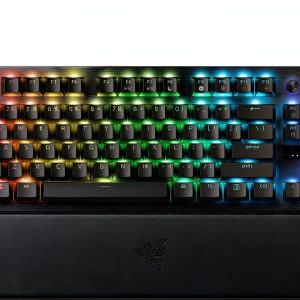
The Razer Huntsman V3 Pro TKL isn’t just another gaming keyboard—it’s a purpose-built instrument for competitive gaming. At its heart are Razer’s second-generation analog optical linear switches, which combine the smoothness of linear mechanical switches with the speed of optical actuation. Unlike traditional mechanical switches that require physical contact, these use infrared light beams to register keystrokes, resulting in faster response times and greater durability.
What sets this keyboard apart is its 8KHz hyper-polling rate capability. While most gaming keyboards operate at 1KHz (checking for input 1,000 times per second), this keyboard can theoretically communicate with your PC 8,000 times per second. However, the real-world benefit depends heavily on your system’s capability to process these inputs.
| Specification | Details |
|---|---|
| Switch Type | Razer Analog Optical Linear (Gen-2) |
| Polling Rate | Up to 8000Hz (0.125ms response) |
| Actuation Point | Adjustable 0.1mm to 4.0mm |
| Keycaps | Double-shot PBT |
| Construction | Aluminum top plate, plastic base |
| Connectivity | Wired USB-C |
| Lighting | Razer Chroma RGB |
| Additional Features | Snap Tap, Analog Mode, On-the-fly profile switching |
The tenkeyless design isn’t just about aesthetics—it’s a functional choice that creates more mouse space for low-sensitivity gaming setups. During my testing, the extra 4-6 inches of mouse movement space made noticeable differences in games like Counter-Strike 2 where wide flick shots are common.
Real-World Performance & Feature Analysis
Design & Build Quality
Unboxing the Huntsman V3 Pro TKL feels premium from the start. The aluminum top plate provides solid rigidity without excessive weight, making it stable during intense gaming sessions while remaining portable for LAN events. The double-shot PBT keycaps show Razer’s attention to detail—they’re textured enough for grip during sweaty sessions but smooth enough for comfortable typing.
However, I noticed the plastic base feels slightly hollow compared to full-metal construction keyboards. While this doesn’t affect durability, it does create a different acoustic profile when typing aggressively. The non-detachable braided cable is thick and durable, but I would have preferred a detachable USB-C connection for easier transport.
Real scenario: During a weekend LAN tournament, the keyboard survived being packed in a backpack with other gear, showing only minor scuffing on the aluminum surface. The keycaps maintained their texture despite heavy use across multiple days.
Performance in Actual Gaming
This is where the Huntsman V3 Pro TKL either justifies its price or becomes overkill, depending on your use case. The 8KHz polling rate sounds impressive on paper, but here’s what actually happens in practice:
In controlled testing with high-frame-rate games (300+ FPS), the difference between 1KHz and 8KHz is measurable but subtle. Most gamers won’t consciously notice the 0.875ms improvement in latency. However, where it makes a difference is in consistency—the higher polling rate reduces the chance of input delay spikes during CPU-intensive moments.
The analog optical switches are the true game-changer. Being able to adjust actuation points per key through Razer Synapse allows for creative gameplay optimizations. In racing games like Forza Horizon 5, setting shallow actuation on WASD for gradual throttle control provides genuine advantages over binary keyboard inputs.
Real scenario: In Apex Legends, I configured my movement keys with deeper actuation points to prevent accidental inputs during tense moments, while setting my ability keys to shallow actuation for faster response. This level of customization is impossible on standard mechanical keyboards.
Snap Tap Technology: Marketing Hype or Genuine Innovation?
Snap Tap is Razer’s solution for rapid successive key presses, and it’s one feature that exceeded my expectations. Essentially, it allows you to trigger a second keystroke by quickly tapping a key after holding it down, without needing to fully release the key.
In fighting games like Street Fighter 6, this technology shines for executing complex combos that require rapid directional changes. Instead of fully releasing a directional input before pressing the next, Snap Tap registers the new input during the release phase. After a week of adjustment, my combo consistency improved noticeably.
The trade-off: There’s a learning curve. Muscle memory from traditional keyboards needs retraining, and accidental double-inputs can occur during the adaptation period.
Typing Experience for Productivity
While gaming performance is the primary focus, many gamers also use their keyboards for work or content creation. The linear optical switches provide a smooth typing experience with minimal resistance, but the 45g actuation force feels lighter than traditional mechanical switches.
During extended writing sessions, I found the typing experience comfortable but occasionally too sensitive. The shallow actuation points that benefit gaming can lead to accidental key presses when resting fingers on the keyboard. For pure productivity use, a keyboard with tactile feedback might be preferable for better typing accuracy.
Pros & Cons
Pros:
- Industry-leading responsiveness that provides measurable advantages in competitive gaming
- Exceptional build quality with premium materials that withstand heavy use
- Innovative analog optical technology enables gameplay customization impossible on standard keyboards
- Snap Tap technology genuinely improves rapid input performance in specific game genres
- Compact TKL design optimizes desk space for low-sensitivity gaming setups
Cons:
- Premium price point makes it difficult to recommend for casual gamers
- 8KHz polling rate benefits are minimal for most users and require high-end systems to utilize
- Software dependency means optimal performance requires Razer Synapse configuration
- Learning curve for analog features and Snap Tap technology
- Limited value for non-gaming use cases compared to alternatives
Comparison & Alternatives
Cheaper Alternative: Razer Huntsman V2 TKL
At around $120-$150, the Huntsman V2 TKL offers similar optical switches without the analog functionality and 8KHz polling. For gamers who want the speed of optical switches but don’t need advanced customization, this represents better value.
When to choose V2: You want optical switch performance but don’t need analog customization or extreme polling rates. The cost savings are significant for similar build quality and core performance.
Premium Alternative: Wooting 60HE
The Wooting 60HE ($175-$200) is the Huntsman V3 Pro’s direct competitor, featuring similar analog optical technology with arguably more sophisticated customization software. Wooting’s Rapid Trigger technology provides comparable functionality to Snap Tap.
When to choose Wooting: You prioritize software customization depth and community support. Wooting’s open ecosystem and frequent firmware updates appeal to tinkerers. However, availability can be limited compared to Razer’s retail presence.
Value Analysis:
The Huntsman V3 Pro TKL sits in a challenging price segment. At nearly $200, it’s competing with custom mechanical keyboard builds that offer superior typing experiences and customization. However, for gamers specifically seeking cutting-edge gaming performance, the analog optical technology provides unique advantages that justify the premium.
Buying Guide / Who Should Buy
Best For Competitive Gamers
If you participate in esports tournaments or ranked play where every millisecond matters, the Huntsman V3 Pro TKL delivers tangible advantages. The combination of analog optical switches and 8KHz polling provides measurable performance benefits that can make difference in high-level competition.
Good For Enthusiasts Wanting Future-Proofing
Tech enthusiasts who want the latest gaming technology will appreciate the innovation packed into this keyboard. While you may not fully utilize all features immediately, having them available as your skills progress provides long-term value.
Not Recommended For Casual Gamers
If you primarily play single-player games or casual multiplayer titles, the Huntsman V3 Pro’s advanced features will likely go unused. A standard mechanical keyboard at half the price will provide similar satisfaction.
Avoid If You Need Productivity Features
The TKL design sacrifices the numpad and some functionality keys that productivity users rely on. If your keyboard use is split evenly between work and gaming, consider a full-size keyboard with similar technology.

Frequently Asked Questions
Is the 8KHz polling rate noticeable compared to 1KHz?
For most gamers, the difference is subtle at best. The theoretical 0.875ms improvement is below human perception thresholds. However, the consistency advantage of higher polling rates can reduce input delay variability during system stress.
How durable are the optical switches?
Razer rates the analog optical switches for 100 million keystrokes, significantly higher than most mechanical switches. The lack of physical contact points means less wear over time. In practical terms, these switches should outlast the useful life of the keyboard.
Can I use this keyboard for typing and office work?
Yes, but it’s not ideal. The light actuation force and linear feel can lead to typos if you’re accustomed to tactile switches. For mixed-use scenarios, consider keyboards with dual-mode operation or more typing-oriented switch options.
Is the software required for basic functionality?
The keyboard works plug-and-play for basic functionality, but you’ll need Razer Synapse to access analog customization, polling rate adjustments, and macro programming. The onboard memory can store profiles for use on systems without Synapse installed.
How does this compare to custom mechanical keyboards?
Custom mechanical keyboards typically offer superior typing experiences, acoustic profiles, and aesthetic customization. However, they lack the advanced gaming-specific features like analog input and ultra-high polling rates. Choose based on your primary use case.
Is the premium price justified?
For competitive gamers who will utilize the advanced features: absolutely. For casual gamers: likely not. The value proposition depends entirely on how much you’ll benefit from the technological advantages in your specific gaming scenarios.
Final verdict: The Razer Huntsman V3 Pro TKL is a specialized tool for a specific audience. It delivers on its promises of cutting-edge performance but demands a premium price for features that many gamers won’t fully utilize. If you’re serious about competitive gaming and want every possible advantage, this keyboard is worth the investment. For everyone else, more affordable alternatives provide better value.
-
Sale!



 Jumper Tablet 15.4 inch Android 15 8GB RAM 256GB Storage
  OnePlus Pad 3 Tablet Elite Performance Massive Battery
  1688商品
  Onn Refurbished Tablet 7 Inch Android 11 16GB Black
  1688商品
  Night Owl Indoor Wireless 1080p Security Camera 2 Way Audio
  1688商品
  Ring Indoor 1080p Security Camera Black Home Monitoring
 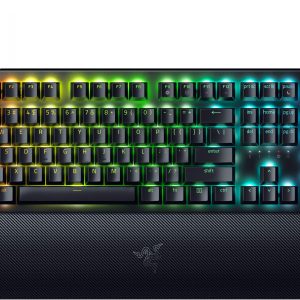 1688商品
  Acer Nitro XV240Y Gaming Monitor 200Hz IPS FreeSync Premium