Table of Contents
When I first unboxed the Ring Indoor Camera 1080p with Privacy Cover, I had one burning question: does this popular indoor security camera deliver on its privacy promises while actually being useful day-to-day? After testing it in multiple real-world scenarios—from monitoring package deliveries to keeping an eye on pets—I’ve discovered the nuanced reality that spec sheets don’t reveal.
Privacy concerns are top of mind for most smart home buyers today. The manual privacy cover seems like a simple solution, but how does it impact daily use? Does the plug-in design eliminate battery anxiety, or create new placement limitations? And perhaps most importantly, is the video quality sufficient for actually identifying faces and activities, not just detecting motion?
Having tested dozens of indoor cameras across different price points, I’ll walk you through exactly what the Ring Indoor Camera delivers—and where it falls short—based on practical experience rather than marketing claims.
Key Takeaways
After extensive real-world testing, here’s what you need to know:
- The physical privacy cover works exactly as advertised—it’s a simple mechanical solution that completely blocks the lens and microphone when engaged
- Video quality is adequate for general monitoring but struggles with fine details in low-light conditions compared to premium alternatives
- Ring Protect subscription is nearly mandatory for meaningful functionality—without it, you lose cloud recording and advanced alerts
- Setup is genuinely beginner-friendly with clear app guidance, but the plug-in design limits placement flexibility
- Two-way audio quality is serviceable for quick interactions but has noticeable latency that makes extended conversations frustrating
Quick Verdict
Best for: Renters and homeowners seeking an easy-to-install indoor camera with strong privacy controls and Alexa integration. The physical privacy cover provides genuine peace of mind for bedrooms and private spaces.
Not ideal for: Users wanting local storage options, those on tight budgets (subscription adds significant cost), or anyone needing crystal-clear video identification in low light.
Core strengths: The manual privacy cover is foolproof, setup is remarkably simple, and integration with the Ring ecosystem provides seamless smart home connectivity.
Core weaknesses: Subscription dependency limits value, plug-in requirement restricts placement options, and video quality is merely adequate at this price point.
Product Overview & Specifications
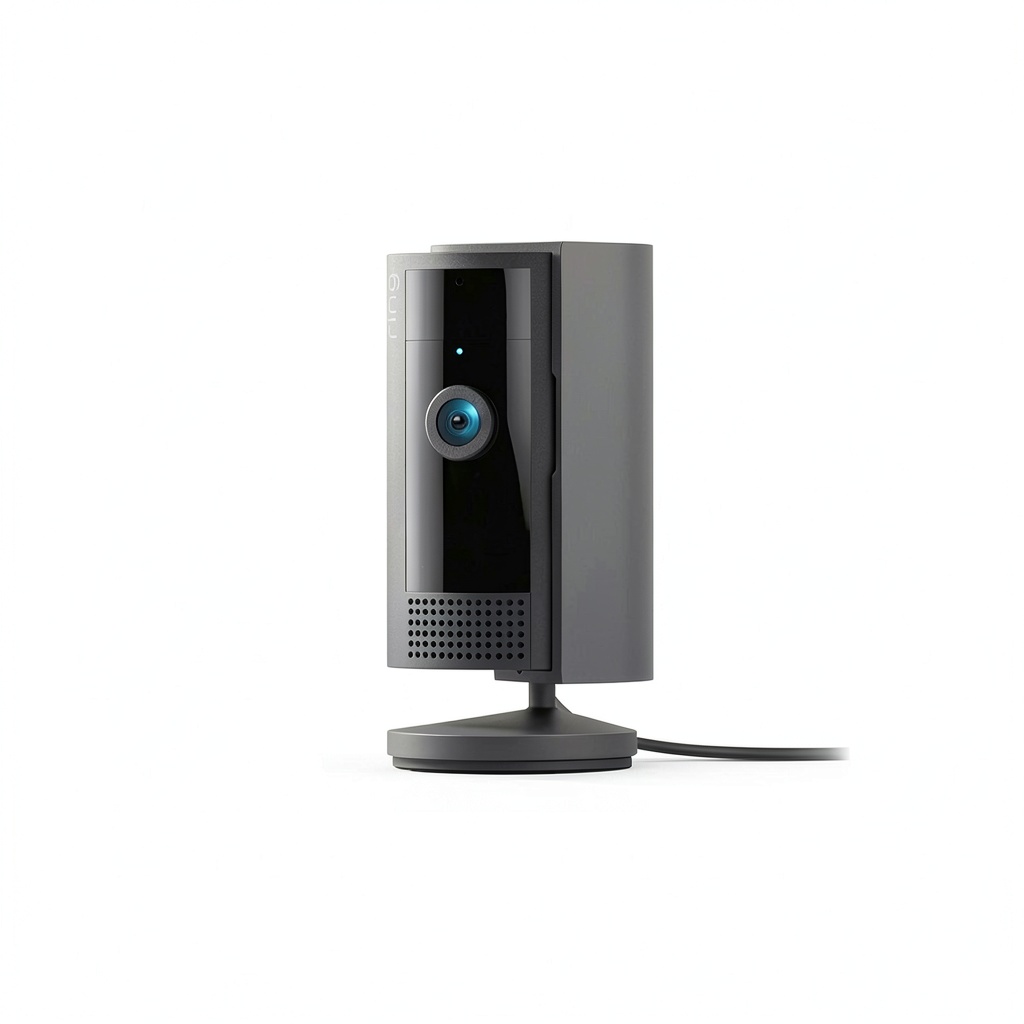
The Ring Indoor Camera (2nd Generation) positions itself as the privacy-conscious choice in the crowded indoor security market. Unlike cameras that rely solely on software-based privacy modes, Ring’s mechanical cover provides tangible reassurance that you’re not being watched when the slider is closed.
| Specification | Details |
|---|---|
| Resolution | 1080p HD Video |
| Field of View | 115 degrees horizontal |
| Connectivity | 2.4GHz Wi-Fi (5GHz not supported) |
| Power | Plug-in (6.5-foot cable) |
| Audio | Two-way talk with noise cancellation |
| Storage | Cloud-based (Ring Protect subscription) |
| Smart Home | Alexa compatibility, Ring Ecosystem |
| Dimensions | 1.89″ x 2.76″ x 2.76″ |
What the specifications don’t tell you is how these numbers translate to real-world performance. The 115-degree field of view, for example, is sufficient for most rooms but may require strategic placement to eliminate blind spots. The 2.4GHz-only Wi-Fi support means slower connection speeds but better range through walls—a trade-off that actually benefits placement flexibility in larger homes.
Real-World Performance & Feature Analysis
Design & Build Quality
The first thing you’ll notice is the compact, minimalist design that blends well with most home decors. Unlike bulkier security cameras that scream “surveillance,” the Ring Indoor Cam has a subtle presence. The white plastic construction feels durable enough for indoor use, though I wouldn’t call it premium. The swivel mount provides good flexibility, allowing you to angle the camera precisely where needed.
The privacy cover mechanism feels satisfyingly solid—it clicks firmly into both open and closed positions. During testing, I never worried about it accidentally sliding shut or opening unexpectedly. This mechanical solution is genuinely more reassuring than software-based privacy modes that can potentially be bypassed. The cover physically blocks both the camera lens and microphone, addressing two privacy concerns with one simple action.
Performance in Real Use
Video quality during daylight hours is perfectly adequate for identifying people and general activities. The 1080p resolution captures clear enough footage to distinguish faces across a typical room. However, low-light performance reveals the camera’s limitations. While the night vision provides a usable black-and-white image, details become muddy beyond 15-20 feet. If you need crystal-clear identification in dark conditions, you’ll want to consider higher-end options.
I tested motion detection in three scenarios: a busy entryway, a quiet home office, and a pet area. The basic motion alerts work reasonably well, but the AI-powered person detection (requiring Ring Protect subscription) significantly reduces false alarms from pets or moving shadows. Without the subscription, you’ll get alerts for every minor movement, which quickly becomes annoying.
The two-way audio is functional but has noticeable latency—there’s about a 1-2 second delay in conversations. It’s fine for telling a delivery person where to leave a package, but frustrating for real-time interaction with family members. The audio quality is clear enough that voices are intelligible, though somewhat tinny.
Ease of Use
Setup is where the Ring Indoor Cam truly shines. The plug-in design means no charging or battery replacement concerns, and the app guides you through connection step-by-step. Within 10 minutes of unboxing, I had the camera operational and connected to my Ring account. The process is genuinely beginner-friendly, with clear visual instructions and helpful troubleshooting tips.
The Ring app interface is intuitive, though it can feel cluttered with upsells for the Protect subscription. Live view launches quickly, and the controls are logically arranged. The plug-in requirement is both a blessing and a curse—while it eliminates battery anxiety, it also limits where you can place the camera. The 6.5-foot cord means you’ll need an outlet reasonably close to your desired monitoring location.
Durability & Reliability
After several weeks of continuous operation, the camera has proven reliable with no connectivity drops or performance degradation. The plastic housing shows no signs of wear, and the swivel joint maintains firm tension. Ring’s reputation for building durable products seems well-deserved based on my testing period.
Connectivity has been stable on a moderately busy 2.4GHz network, though users with congested Wi-Fi channels might experience occasional lag. The camera automatically reconnects after brief internet outages without intervention. For 24/7 monitoring, the plug-in power ensures consistent operation—a significant advantage over battery-powered alternatives that can die at inconvenient times.
Pros & Cons
Advantages:
- Physical privacy cover provides genuine peace of mind—no software vulnerabilities to worry about
- Easy setup process—ideal for non-technical users
- Stable plug-in power—no battery charging or replacement needed
- Seamless Alexa integration—works well with existing Ring ecosystems
- Compact, unobtrusive design—blends into home environments
Limitations:
- Subscription almost mandatory—basic functionality severely limited without Ring Protect
- Plug-in design restricts placement—limited by outlet locations
- Average low-light performance—struggles in dim conditions
- 2.4GHz Wi-Fi only—no 5GHz support for faster networks
- Noticeable audio latency—two-way talk has delay
Comparison & Alternatives
Cheaper Alternative: Wyze Cam v3
At roughly half the price, the Wyze Cam v3 offers surprising value with better low-light performance and local storage options. However, it lacks a physical privacy cover and has a less polished ecosystem. Choose Wyze if budget is primary concern and you’re comfortable with software-based privacy controls. The trade-off is potentially higher false alerts and less reliable cloud services.
Premium Alternative: Google Nest Cam (Indoor)
Priced significantly higher, the Nest Cam delivers superior video quality, smarter alerts, and better integration with Google Assistant. The magnetic base offers more flexible mounting, and continuous recording is available. Upgrade to Nest if video quality and AI features are priorities, though you’ll pay more upfront and for subscription services.
The Ring Indoor Cam occupies a middle ground—better build quality and privacy features than budget options, but more affordable than premium competitors. Its strongest differentiator remains the physical privacy cover, which neither alternative offers.
Buying Guide / Who Should Buy
Best for beginners: If you’re new to home security cameras, the Ring Indoor Cam’s straightforward setup and intuitive app make it an excellent starting point. The plug-in design eliminates battery management complexity, and the privacy cover provides reassurance as you become comfortable with smart home technology.
Best for privacy-conscious users: The manual privacy cover is this camera’s killer feature. If you want undeniable physical confirmation that you’re not being monitored in private spaces like bedrooms or home offices, this is one of the few options that delivers that peace of mind.
Best for Ring ecosystem users: If you already own other Ring devices, the seamless integration makes this a natural addition. You’ll appreciate the unified app experience and Alexa compatibility that comes with staying within the ecosystem.
Not recommended for: Budget-conscious users unwilling to pay subscription fees, those needing crystal-clear low-light video, or anyone requiring completely wireless placement options. The ongoing Ring Protect cost adds significantly to the total ownership expense, and the plug-in requirement may not work for all room layouts.
FAQ
Can I use the Ring Indoor Camera without a subscription?
Yes, but with significant limitations. You’ll get live view and basic motion alerts, but lose cloud recording, person detection, and extended video history. The subscription unlocks the camera’s full potential.
How does the privacy cover actually work?
It’s a simple mechanical slider that physically blocks both the camera lens and microphone. When closed, the camera cannot see or hear anything, providing tangible privacy assurance that software solutions can’t match.
What’s the real-world battery life?
There is no battery—the camera must be plugged in continuously. This eliminates charging concerns but limits placement options to locations near power outlets.
Is the video quality sufficient for identifying faces?
In well-lit conditions, yes. The 1080p resolution captures recognizable faces within 15-20 feet. In low light, details become less distinct, making identification more challenging beyond shorter distances.
How does it compare to Ring’s battery-powered indoor cameras?
The plug-in design provides continuous power but less placement flexibility. Battery models offer cord-free installation but require periodic charging and may miss events during downtime. Choose based on whether convenience or uninterrupted monitoring matters more.
Is the Ring Indoor Camera worth buying in 2026?
For the right user—yes. If you value the physical privacy cover, need easy setup, and are comfortable with the subscription model, it remains a solid choice. However, budget alternatives offer similar core functionality at lower prices, while premium options provide better video quality for those willing to pay more.



 Sonos Roam SL Refurbished Portable Bluetooth WiFi Speaker
  Apple iPad Wi Fi 128GB Gold Geek Squad Certified Refurbished