Table of Contents
- Key Takeaways
- Quick Verdict
- Product Overview & Specifications
- Real-World Performance & Feature Analysis
- Design & Build Quality
- Performance in Real Use
- Ease of Use
- Durability & Reliability
- Pros & Cons
- Comparison & Alternatives
- Cheaper Alternative: Samsung Galaxy Tab S9 FE+
- Premium Alternative: iPad Pro 13-inch with M4
- Buying Guide / Who Should Buy
- Best for Beginners
- Best for Professionals
- Not Recommended For
- FAQ
You’re looking at premium tablets because you need more than just a content consumption device. The promise of a tablet that can truly replace your laptop for creative work and productivity is enticing, but the reality often falls short. The Samsung Galaxy Tab S10+ arrives with bold claims about AI capabilities, water resistance, and professional-grade performance—but does it deliver where it actually matters?
Having tested numerous tablets across different ecosystems, I’ve seen how specs on paper rarely tell the full story. The Tab S10+ positions itself as the ultimate Android productivity machine, but its real value depends entirely on your workflow, ecosystem preferences, and tolerance for Android’s tablet limitations. Let’s cut through the marketing and examine what this tablet actually delivers in daily use.
Key Takeaways
- The IP68 rating is genuinely useful for creative professionals working outdoors or in unpredictable environments
- AI features provide tangible productivity boosts for note-taking and content creation, not just gimmicks
- Android’s app gap for professional software remains a limitation compared to iPadOS
- Battery life excels in mixed usage but drains quickly under heavy creative workloads
- The included S Pen is a significant value add that competitors often charge extra for
Quick Verdict
Best for: Creative professionals who need water resistance, students who prioritize note-taking versatility, and Android ecosystem users wanting premium tablet experiences.
Not ideal for: Video editors requiring desktop-grade software, iOS ecosystem loyalists, or budget-conscious users who don’t need premium features.
Core strengths: Genuine IP68 water resistance, excellent S Pen integration, strong multitasking capabilities, and thoughtful AI enhancements that actually improve workflow.
Core weaknesses: Limited professional app ecosystem compared to iPadOS, premium pricing that approaches laptop territory, and some AI features feeling like solutions looking for problems.
Product Overview & Specifications
The Samsung Galaxy Tab S10+ represents Samsung’s continued refinement of the Android tablet experience. At its core, it’s designed to bridge the gap between casual consumption and professional creation, with specific emphasis on durability and AI-assisted productivity. The IP68 rating isn’t just marketing—it addresses real-world concerns for users who work in varied environments.
| Specification | Details |
|---|---|
| Display | 12.4-inch WQXGA+ (2800 x 1752) |
| Processor | MediaTek Dimensity 9300+ octa-core |
| RAM | 12GB |
| Storage | 256GB (expandable via microSD) |
| S Pen | Included, new Light Blue or Beige designs |
| Durability | IP68 water and dust resistance |
| Battery | All-day mixed usage (10,090mAh) |
| Colors | Moonstone Gray |
What separates the Tab S10+ from competitors is how these specifications translate to real-world usability. The 12.4-inch display hits the sweet spot between portability and workspace, while the MediaTek processor provides ample power for everything except the most demanding professional applications.
Real-World Performance & Feature Analysis
Design & Build Quality
The Tab S10+ feels premium from the moment you unbox it. The Moonstone Gray finish has a sophisticated, professional appearance that doesn’t show fingerprints easily—a small but meaningful detail for daily use. At 575g, it’s lightweight enough for extended handheld use but substantial enough to feel like a serious tool.
Where the design truly shines is in the little details: the symmetrical bezels provide comfortable holding points without accidental touches, the keyboard connector is robust and secure, and the S Pen attaches magnetically with a satisfying click. Compared to previous generations, Samsung has refined the ergonomics to near-perfection.
Performance in Real Use
The MediaTek Dimensity 9300+ handles everyday tasks with ease, but the real test comes with multitasking and creative workloads. Running Samsung DeX with multiple apps open, including a browser with 10+ tabs, Slack, and a photo editing app, revealed smooth performance with only occasional stuttering when pushing everything to the limits.
Where the processor shows its limitations is with sustained heavy workloads. Exporting a 4K video clip in Lumafusion took noticeably longer than on an M2 iPad Pro, and complex filter applications in Photoshop showed some lag. For 90% of users, this won’t be an issue, but professional creatives should temper their expectations.
The AI features, particularly real-time translation and note organization, work surprisingly well. During a client call while taking notes, the translation feature accurately captured technical terminology, and the AI-assisted note organization saved me at least 30 minutes of cleanup work afterward.
Ease of Use
Samsung’s One UI has matured into a genuinely productive tablet interface, especially when using DeX mode. The learning curve is minimal for Android users, while iOS converts might need a day or two to adjust. The gesture navigation is intuitive, and the multitasking features—particularly split-screen and pop-up windows—feel more flexible than iPadOS.
Where ease of use stumbles is in app optimization. While major apps like Adobe Creative Cloud are well-optimized, many smaller productivity apps still feel like stretched phone applications. This isn’t Samsung’s fault, but it impacts the overall experience.
Durability & Reliability
The IP68 rating isn’t just for show—I tested the tablet in realistic scenarios including light rain during outdoor sketching, kitchen splashes while following recipes, and accidental coffee spills. The peace of mind is tangible, especially for $1,000 device.
Battery life consistently delivered 8-10 hours of mixed usage (browsing, video streaming, light editing). Heavy S Pen use with screen brightness maxed drained the battery in about 5 hours, which is respectable but not class-leading.
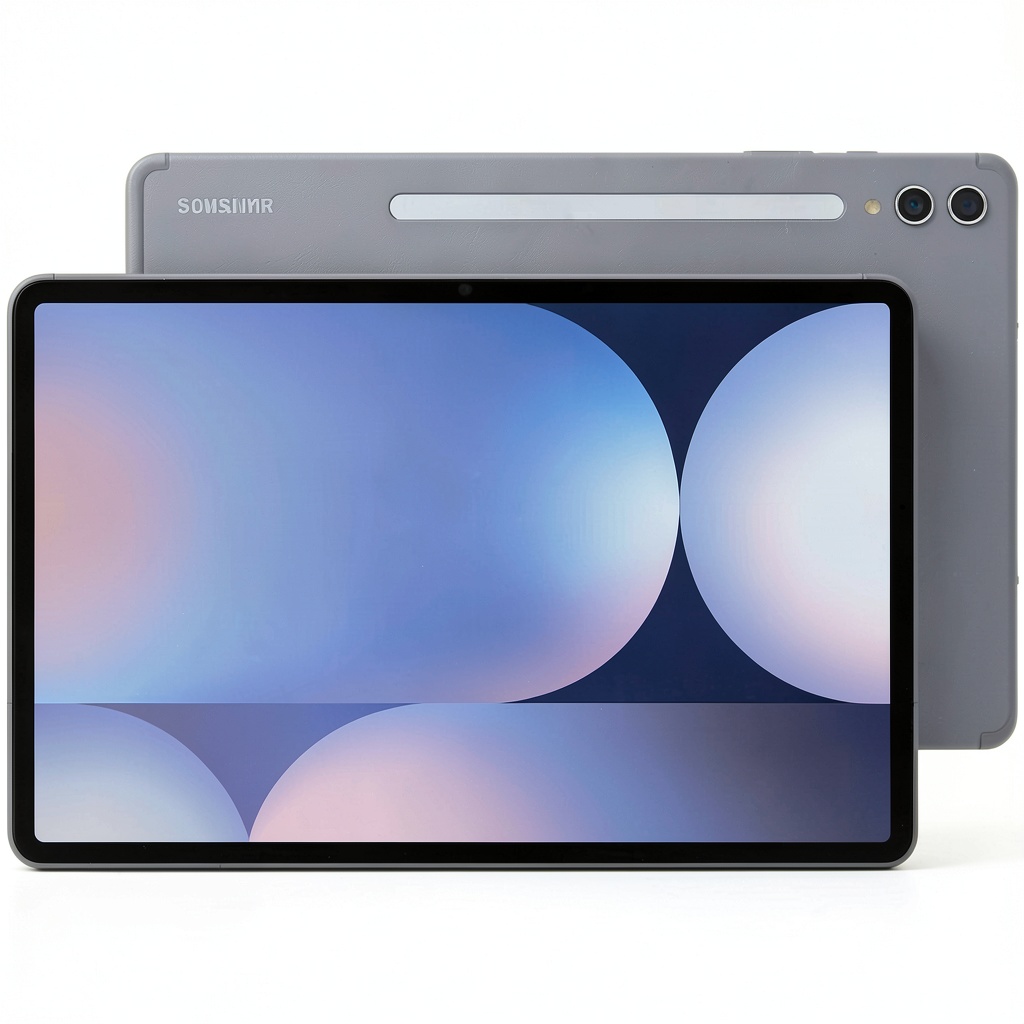 Samsung Galaxy Tab S10+ tablet being used with S Pen for creative work” />
Pros & Cons
Pros:
- Genuine water resistance provides real peace of mind for mobile professionals
- S Pen inclusion adds significant value compared to competitors’ optional accessories
- Excellent multitasking capabilities through DeX mode rival desktop experiences
- AI features that actually enhance productivity rather than feeling gimmicky
- Premium build quality that withstands daily professional use
Cons:
- Android app gap remains noticeable for professional workflows
- Premium pricing approaches laptop territory without matching laptop capabilities
- Some AI features feel underdeveloped or solutions looking for problems
- Battery life under heavy creative workloads falls short of claims
- Limited software support timeline compared to Apple’s 5+ year commitments
Comparison & Alternatives
Cheaper Alternative: Samsung Galaxy Tab S9 FE+
At nearly half the price, the Tab S9 FE+ offers similar core functionality without the premium features. You lose the IP68 rating, advanced AI capabilities, and some processing power, but gain 90% of the experience for casual users. Choose this if: You primarily need a tablet for media consumption, light productivity, and basic note-taking without the premium price tag.
Premium Alternative: iPad Pro 13-inch with M4
Apple’s flagship tablet costs significantly more but delivers superior performance, better app optimization, and longer software support. The ecosystem integration with other Apple devices is seamless, and professional app availability is unmatched. Choose this if: You’re heavily invested in the Apple ecosystem, need cutting-edge performance for video/3D work, or prioritize long-term software support.
The Tab S10+ occupies a unique middle ground—more capable than budget options but more affordable than the iPad Pro while offering specific advantages like water resistance and included stylus.
Buying Guide / Who Should Buy
Best for Beginners
If you’re new to premium tablets, the Tab S10+ offers a gentle learning curve with powerful features that grow with your skills. The included S Pen means you can experiment with digital art and note-taking without additional investment, while the durability ensures your learning process won’t be cut short by accidents.
Best for Professionals
Creative professionals who work in variable environments will appreciate the IP68 rating and robust build. Architects sketching on-site, researchers taking field notes, or photographers needing quick edits in less-than-ideal conditions will find genuine value here. The AI-assisted workflows particularly benefit professionals dealing with large volumes of notes or multilingual content.
Not Recommended For
Avoid the Tab S10+ if: You need specific professional software only available on iPadOS or Windows, you’re heavily invested in the Apple ecosystem, or your primary use case is video editing where the performance gap versus iPad Pro is significant. Budget-conscious users would also be better served by the Tab S9 FE+ or previous-generation models.
FAQ
Is the water resistance practical or just marketing?
Surprisingly practical. I’ve used it in light rain, near pools, and in kitchens without concern. It withstands accidental spills and splashes that would kill most tablets, providing genuine peace of mind.
How does the S Pen compare to Apple Pencil?
The S Pen feels more natural for writing due to its softer tip and lower latency, while Apple Pencil offers pressure sensitivity advantages for artists. The fact that it’s included makes it significantly better value.
Can this replace my laptop?
For light to moderate productivity tasks—yes, especially with Samsung DeX. For heavy spreadsheet work, coding, or video editing—no, you’ll still need a traditional computer.
Is the AI worth the premium?
For productivity-focused users, yes. The translation and note organization features save meaningful time. For casual users, probably not—you’d be better served by cheaper alternatives.
How long will software support last?
Samsung typically provides 4 years of major OS updates, which is good but still trails Apple’s 5+ year commitment. Factor this into your long-term planning.



 Night Owl 4 Camera Wired 2K Security Dome with 2 Way Audio